Build DM flows you can read out loud
Messages, questions, waits, tags, checks and handover, in a builder where every block says what it does.
Updated 11 November 2026
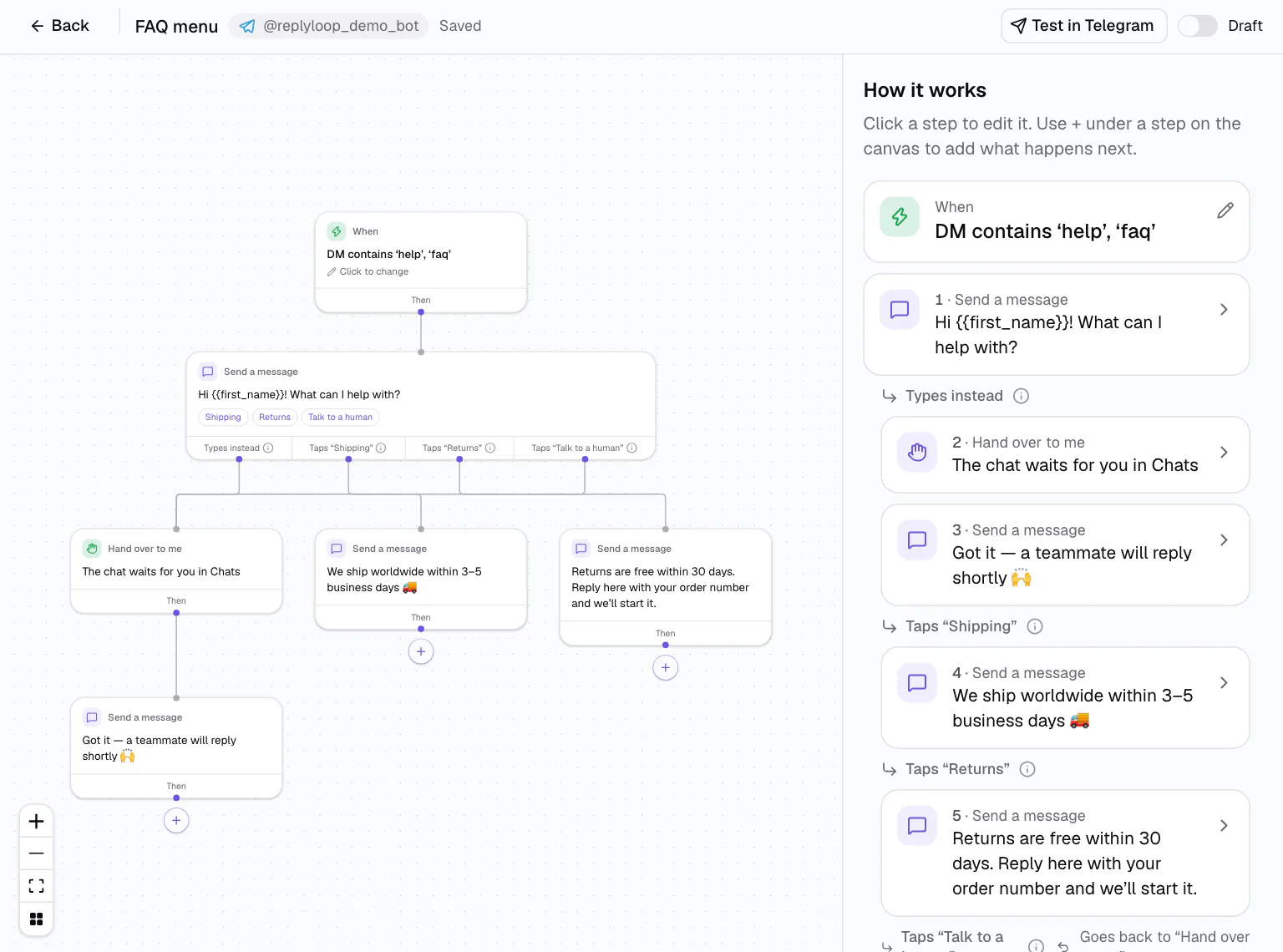
Some conversations need more than one reply: ask for an email, wait a day, check whether they follow you, send a different message to each answer. The DMCrew builder lays that out as a flow that reads like sentences: “When DM contains ‘help’, then send a message”.
Exits are named in words, too: Then, Yes or No, Taps “Shipping”, Types instead. You can read a flow out loud and know what it does.
How it works
Choose what starts it
A direct message, a comment on a post, a story reply or a bot link; up to four triggers per automation.
Add steps
Send a message, Ask a question, Wait, Check something, Add or remove a tag, Mark as converted, Hand over to me.
Test, then go live
Run it in the Simulator, watch the path it takes, flip it to Live. It saves itself about a second after you stop typing.
Every step you need, none you don't
A message can hold 1,000 characters, three buttons, five quick replies and an image or video link, with {{first_name}}, {{username}} and your own fields. “Ask a question” checks the answer is the kind you asked for, such as an email, and saves it to the contact. “Check something” branches on whether they follow you or have a tag.
- Waits in minutes, hours or days
- Tags to segment, conversions to measure
- “Hand over to me” puts the chat in your inbox
On a phone, it is a list
On a laptop the flow is a canvas that tidies itself. On a phone or tablet the same flow becomes a numbered list of steps with “+ Add a step”, and each step's settings open in a bottom sheet. Build it on the train, launch it before you post.
Start simple, grow into it
Most flows start life as the keyword chatbot and move to the builder when they need a second step. Gate a reward behind the follower check, end on a “Mark as converted” step and the result shows up in conversion tracking.
Before going live, run it in the Simulator and see the exact path a test contact took.
Templates to start from
Six ready-made flows ship with the product: Keyword reply, Comment-to-DM lead magnet, Story reply thank-you, Collect email, FAQ menu and Follower gate. Each opens in the builder with its steps filled in, and each one hands the chat to you if the person types instead of tapping, so nobody is left talking to a menu.
Who it is for
Email capture
DM “newsletter” → ask for the email, validate it, tag the contact, count the conversion.
Follow to unlock
DM “bonus” → followers get the link, everyone else is asked to follow and try again.
Story replies
Reply to a story → a thank-you with Tips and Offers quick replies, tagging people by what they pick.
Works on
Questions
Flow builder: questions
No. Flows are made of steps like “Send a message” or “Check if they follow you”, and each exit is named in words: Then, Yes, No, Taps “Done”, Types instead.
Yes. On phones and tablets the same flow is a numbered list of steps, with each step's settings in a bottom sheet.
A direct message, a comment on a post, a story reply or a bot link, up to four triggers per automation. Telegram supports DMs and bot links.
Automatically, about a second after you stop typing. ⌘S saves at once.