Run every automation in a phone before your audience does
Play the other person: send a DM, comment or story reply and watch your automation answer in a phone.
Updated 11 November 2026
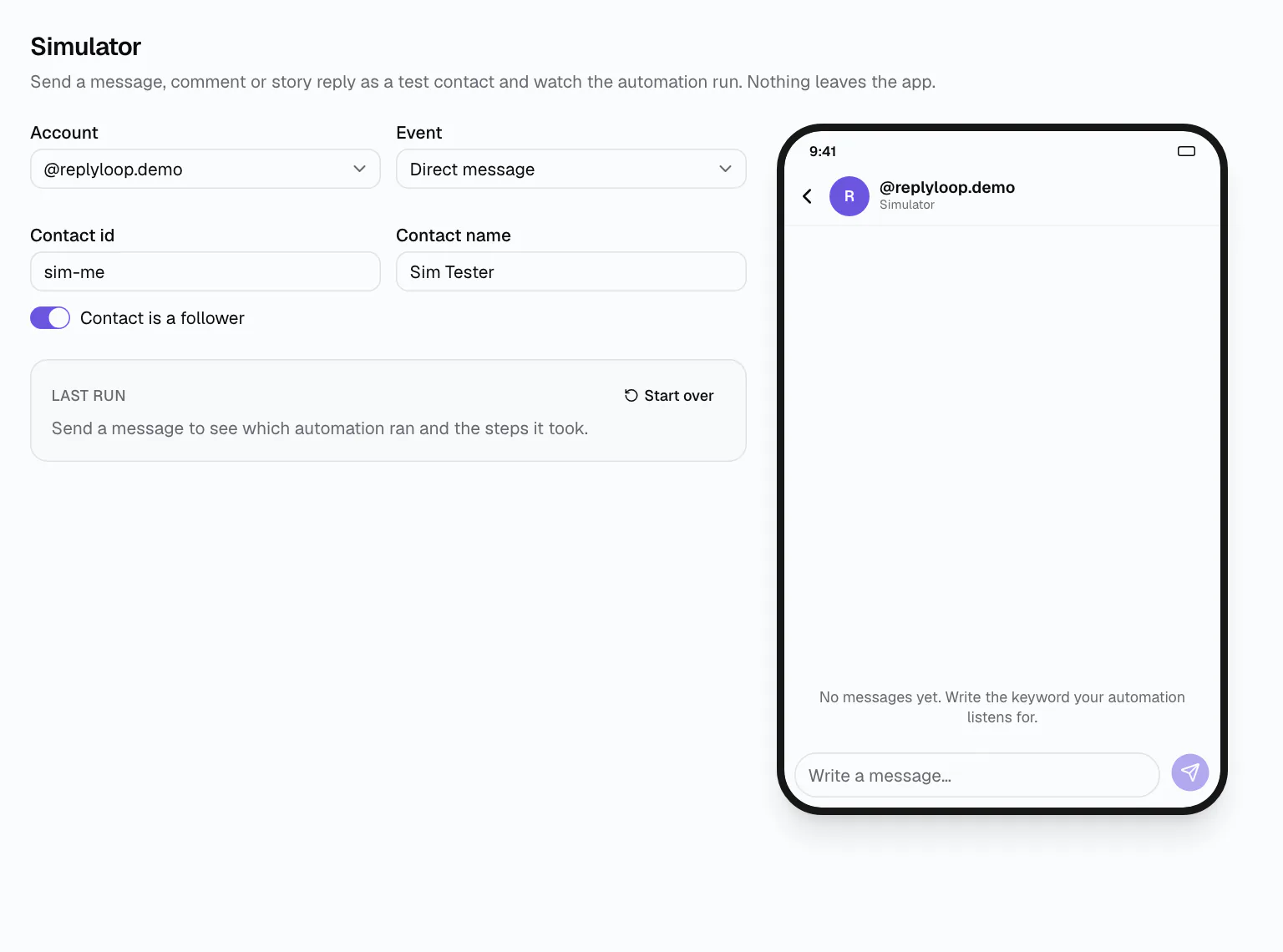
Testing a DM automation usually means a second account, a friend's phone and a lot of deleting. The Simulator is a phone chat inside DMCrew where you play the person writing to you, on any account you connected.
Pick the event (a DM on Telegram; a DM, comment or story reply on Instagram; a DM or comment on Messenger), choose whether your test contact follows you, and type.
How it works
Pick account and event
The account you are testing and what the test contact does: message, comment or story reply.
Type like a follower
Send the keyword. The reply appears in a phone styled like the channel, with buttons you can tap.
Read the path
The Last run panel shows which automation answered and every step it took; if nothing matched, it says so.
Nothing leaves the app
Simulator messages never reach the network, so you can test a broadcast-style flow or a follower gate as often as you like. The Simulator account does not count toward your plan's account limit.
Every flow in the visual flow builder has a “Test in simulator” button, and launching a keyword chatbot offers a test straight away.
- Test as a follower or a non-follower
- Tap buttons and quick replies like the real thing
- See the exact path a run took
Real Telegram in one tap
For a Telegram auto-reply bot, “Test in Telegram” opens your bot in the Telegram app with a start link, so the automation runs on your own phone. Tests are refused while the automation is a draft or paused, so you never test something that will not run.
Find the problem before your audience does
Wrong keyword match? The Last run panel says no automation answered. Branch going the wrong way? It shows which exit was taken. Fix it, send again, and when it works, flip the switch to Live.
Start with the keyword chatbot: three steps, then a test in the same minute.
What you can simulate
Telegram accounts take messages; Instagram accounts take DMs, comments and story replies; Messenger accounts take DMs and comments. Set the test contact's id and name to see personalised replies with {{first_name}}, and switch “Contact is a follower” on or off to test both sides of a follower check. “Start over” clears the run so you can try again from the first message.
Who it is for
Before a giveaway
Comment the keyword as a non-follower, check the follow prompt, then as a follower, check the link.
Long flows
Walk every branch of an FAQ menu without asking a friend to tap through it.
Team handoff
An assistant changes a reply; the Simulator shows it still works before it goes live.
Works on
Questions
Simulator: questions
No. The Simulator plays the other person: pick the account, the event and the contact's name, then type.
No. Simulator messages never leave DMCrew, and the Simulator account never counts toward your plan's account limit.
Yes. “Test in Telegram” opens your bot with a start link, so the automation runs in the Telegram app on your phone.
In the Simulator, yes: it runs whatever matches. “Test in Telegram” needs the automation to be live, so it never starts something that will not run.
Yes. The Last run panel names the automation that ran and lists every step and exit it took. If nothing matched, it tells you so instead of staying silent.