Let the Claude or ChatGPT you already use work inside DMCrew
Ask the Claude or ChatGPT you already use to look things up and set things up in DMCrew. No credits, and it never messages anyone.
Updated 11 November 2026
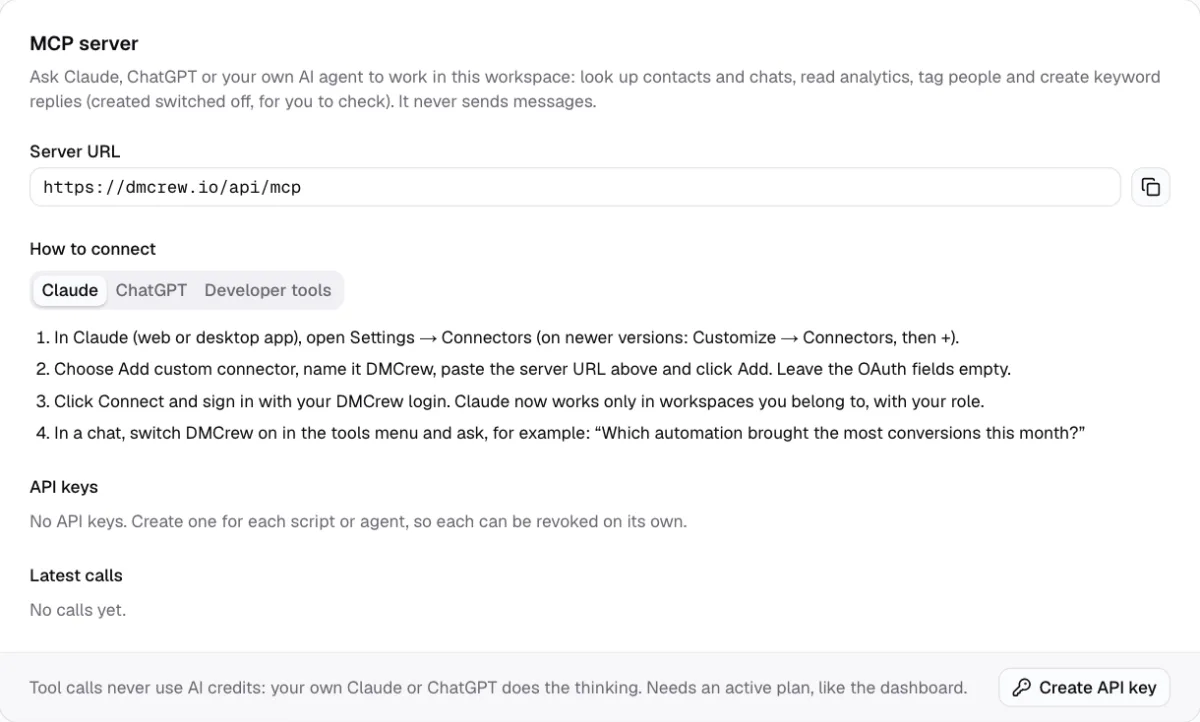
MCP, the Model Context Protocol, is the open standard AI assistants use to work with other apps. DMCrew's MCP server lets your own Claude or ChatGPT use DMCrew's tools: find who took your guide, read how an automation converts, tag people, or set up a keyword reply, in one sentence instead of a few screens.
It is not the AI that answers your followers. That is the the AI agent, which runs by itself in your DMs. The MCP server works only when you ask your assistant something, never sends a message, and uses no DMCrew credits: your Claude or ChatGPT plan does the thinking.
How it works
Copy the URL
In DMCrew, open Settings → MCP server and copy https://dmcrew.io/api/mcp.
Add it to your assistant
Claude: Settings → Connectors → Add custom connector. ChatGPT: Apps & Connectors → Create, with developer mode on.
Sign in and ask
Sign in with your DMCrew login, switch DMCrew on in the chat, and ask in plain words.
What your assistant can do
The tools cover what you would otherwise click through: list your connected accounts and automations, search contacts by tag, account, name or date, open a contact or a conversation, read customers and conversions for any period, tag or untag people, and create a keyword reply with its message and links.
New keyword replies are created switched off. Open them in the keyword chatbot or the the visual flow builder, check them, and switch them on yourself.
- “Who commented ‘guide’ this week and did they convert?”
- “Tag everyone who asked about prices as lead”
- “Create a keyword reply for ‘price’ with my booking link”
Safe by design
Your assistant signs in as you, so it sees only the workspaces you belong to and can do only what your role allows: an operator reads, an admin can also tag and create. It cannot send DMs or broadcasts, delete contacts or automations, or touch billing. The latest calls are listed in Settings with who made them, and the workspace needs an active plan, like the app.
- Signs in with your DMCrew login
- Never sends messages
- Latest calls shown in Settings
For Claude Code, Cursor and your own agents
Developer tools and scripts connect with a workspace API key instead of a sign-in. An admin creates one in Settings → MCP server, picks read-only or read-and-change, and sends it as a Bearer token; the setup line for Claude Code and a ready mcp.json for Cursor are on the same card. Revoke a key and it stops on its next call.
MCP, the AI agent or your own key?
Want your followers answered automatically? That is the AI agent, on your plan's credits or on your own OpenAI or Claude key connected in Billing. Want your assistant to work in DMCrew for you? That is the MCP server, on your own Claude or ChatGPT plan. Many creators use both: the agent in the DMs, their assistant for the weekly review. Plans are on plans and prices.
Who it is for
Weekly review
Ask which posts brought customers last week and what people asked about.
Launch prep
Tag everyone who asked about the course as lead, and set up the keyword for tomorrow's post.
Agencies of one
Let your own scripts create keyword replies from a brief, then check them in the app.
Works on
Questions
MCP server: questions
The Model Context Protocol is an open standard that lets AI assistants such as Claude or ChatGPT use tools from other apps. DMCrew's MCP server is our side of that connection.
No. It works only when you ask your assistant something, and it never sends a message. Answering followers automatically is the job of the AI agent.
No. Your own Claude or ChatGPT does the thinking, on your plan with them. DMCrew only runs the tools. Your DMCrew workspace needs an active plan.
Only the workspaces you belong to, with your role there: an operator can read, an admin can also tag contacts and create keyword replies, which start switched off for you to check.